
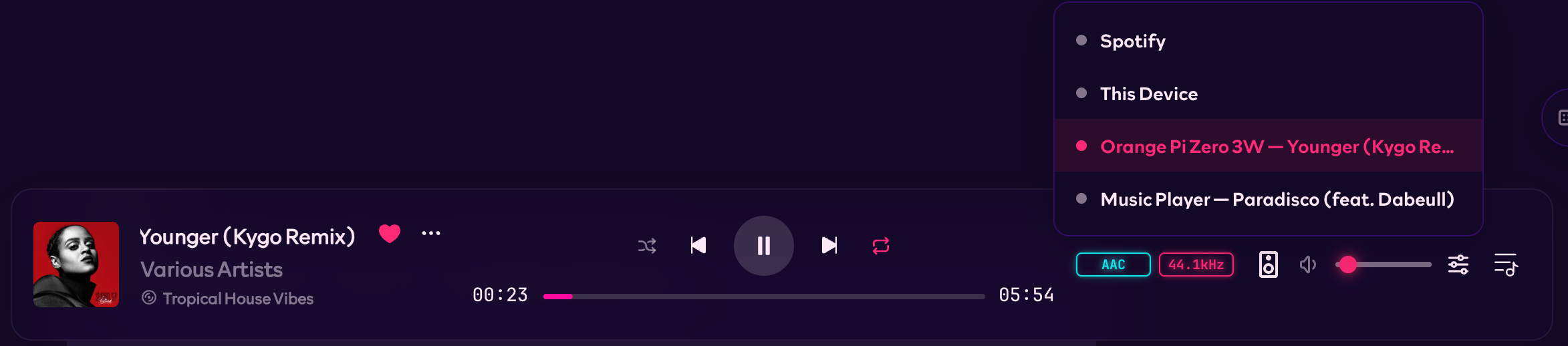
@rocksky/playerd is Rocksky’s official headless music player. Connect a Raspberry Pi to your speakers, start the daemon, and choose it in the Rocksky Web player. You can browse your library, change tracks, edit the queue, and adjust the volume from another device. The player needs no screen or desktop session.
Install
Prebuilt binaries support Linux x86_64, Linux aarch64, and Apple Silicon Macs. Use a 64-bit operating system on your Raspberry Pi. Other platforms need a build from source./usr/local/bin when writable, or ~/.local/bin otherwise. Make sure the install directory is in your PATH.
On Debian or Ubuntu, install the ALSA runtime if it is missing:
Sign in and start playing
Install the Rocksky CLI, then sign in with your Atmosphere account handle on the computer running playerd:rocksky login opens a browser-based authorization flow. On a headless machine, use the access-token option below if you cannot complete that flow locally.
Run the CLI and playerd as the same operating-system user. By default, playerd reads the session from ~/.rocksky/token.json.
Open Rocksky with the same account, choose Living Room in the player’s device picker, and play music from your library. The audio comes from the computer running playerd.
You can also start with a local file or directory:
A player appears in the device list after it publishes track state. If a newly
started device is missing, try starting it with a local music file.
Other ways to authenticate
Playerd checks these sources in order:--tokenor theROCKSKY_TOKENenvironment variable.tokenin its configuration file.- The CLI token file, whose location you can override with
token_path.
ROCKSKY_TOKEN. Treat this as a secret; do not commit it to your configuration repository.
What you can play
Playerd plays local audio, your Rocksky uploads, and tracks available through your Rocksky Navidrome library. It resolves stream URLs when you enqueue tracks and provisions Navidrome credentials on first use. Those credentials are cached in~/.rocksky/navidrome.json and shared with the CLI.
A track in someone’s listening history is not necessarily available to stream. Remote queue items need an upload or library track that your account can access.
See Rocksky as a personal Navidrome server for more about your library.
Scrobbling and saved playback
Playerd records a scrobble after you listen to half a track or four minutes, whichever comes first. It does this itself, so you can close the browser and keep listening. The primary remote device supplies your profile’s now-playing status. Selecting another primary device does not disable playerd’s own scrobbling. Setscrobble = false if you want to turn that off.
By default, playerd saves the queue and playback position. After a restart, it restores them paused; it does not start playing automatically.
Configure playerd
Create~/.rocksky/playerd.toml:
playerd --help for the available flags.
cpal uses your system’s default audio output. Playerd also supports raw PCM output through stdout, a pre-existing fifo:/path, or a listening unix:/path or tcp:address socket. Socket outputs wait for a client before playback starts.
With sync_audio_settings = true, playerd follows the audio settings saved to your Atmosphere account. You can also change supported settings remotely, including the equalizer, ReplayGain, crossfade, and Auto DJ.
Restart playerd after changing startup settings such as output, buffer_seconds, resume, scrobble, or sync_audio_settings.
Run in the background on Linux
You can use a systemd user service to keep playerd running. First, find the executable:~/.config/systemd/user/playerd.service. Replace the ExecStart path below with the absolute path returned by command -v playerd:
Troubleshooting
For more detailed logs, stop the background service first, then run: