> ## Documentation Index
> Fetch the complete documentation index at: https://docs.rocksky.app/llms.txt
> Use this file to discover all available pages before exploring further.
# Web Scrobbler
> Scrobble plays from YouTube, SoundCloud, Spotify Web, and 100+ other sites with the Web Scrobbler browser extension.
[Web Scrobbler](https://github.com/web-scrobbler/web-scrobbler) is a free
browser extension that detects what you're playing on YouTube, SoundCloud,
Spotify Web, Bandcamp, Apple Music Web, and over 100 other sites. Point its
custom webhook at Rocksky and every detected play lands in your timeline.
## Prerequisites
* A [Rocksky](https://rocksky.app) account
* A supported browser (Chrome, Firefox, Edge, or any Chromium-based browser)
## Setup
Install the extension from the
[Web Scrobbler repository](https://github.com/web-scrobbler/web-scrobbler)
or your browser's add-on store. Pin it to the toolbar so you can confirm
detections.
Sign in to [rocksky.app](https://rocksky.app), open the avatar menu in
the top-right, and select **Web Scrobbler**. A modal pops up with a
personal webhook URL of the form:
```
https://webscrobbler.rocksky.app/
```
Click the copy icon next to the URL.
Your webhook UUID is created automatically the first time you open the
Web Scrobbler modal. Keep it private — anyone with the URL can post
scrobbles to your account.
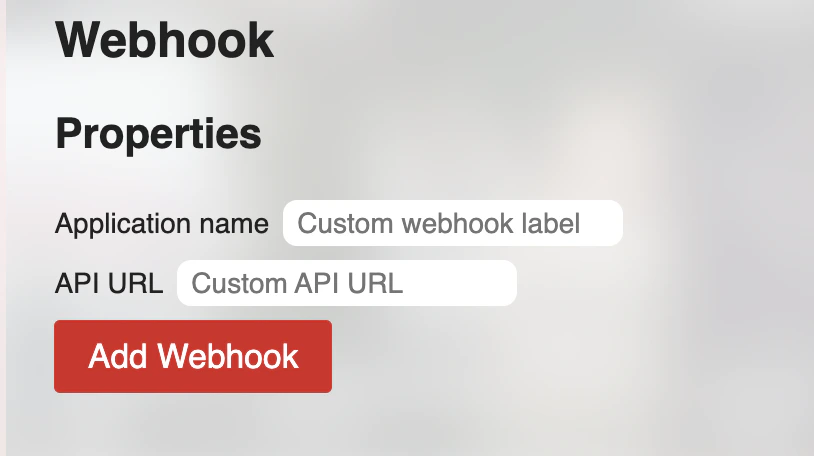
Open the Web Scrobbler extension settings and go to
**Accounts → Webhook → API URL**. Paste the URL you copied and save.
 Play a song on any supported site (YouTube is the easiest test) and
let it run past the scrobble threshold (usually \~30 seconds or 50% of
the track, whichever comes first). Refresh your Rocksky profile — the
play should appear.
## What gets sent
Web Scrobbler posts a JSON payload to the webhook for two event types:
* **Now playing** — when a track starts. Surfaces as your current "Now
playing" status on Rocksky.
* **Scrobble** — when the track meets Web Scrobbler's threshold. Stored as
a permanent scrobble.
Track metadata is best-effort — Web Scrobbler reads what each site exposes,
so the title/artist/album fidelity depends on the source. Rocksky normalises
the incoming text and tries to match it against its catalog.
## Rotating the webhook
If your webhook URL leaks, reach out on
[Discord](https://discord.gg/EVcBy2fVa3) to have the UUID rotated. After
rotation, paste the new URL into Web Scrobbler's API URL field — the old
one will start rejecting submissions.
Web Scrobbler detection runs in the page context of each site. Some
sites change their DOM and break detection temporarily — check
[the Web Scrobbler issue tracker](https://github.com/web-scrobbler/web-scrobbler/issues)
if a specific site stops scrobbling.
Play a song on any supported site (YouTube is the easiest test) and
let it run past the scrobble threshold (usually \~30 seconds or 50% of
the track, whichever comes first). Refresh your Rocksky profile — the
play should appear.
## What gets sent
Web Scrobbler posts a JSON payload to the webhook for two event types:
* **Now playing** — when a track starts. Surfaces as your current "Now
playing" status on Rocksky.
* **Scrobble** — when the track meets Web Scrobbler's threshold. Stored as
a permanent scrobble.
Track metadata is best-effort — Web Scrobbler reads what each site exposes,
so the title/artist/album fidelity depends on the source. Rocksky normalises
the incoming text and tries to match it against its catalog.
## Rotating the webhook
If your webhook URL leaks, reach out on
[Discord](https://discord.gg/EVcBy2fVa3) to have the UUID rotated. After
rotation, paste the new URL into Web Scrobbler's API URL field — the old
one will start rejecting submissions.
Web Scrobbler detection runs in the page context of each site. Some
sites change their DOM and break detection temporarily — check
[the Web Scrobbler issue tracker](https://github.com/web-scrobbler/web-scrobbler/issues)
if a specific site stops scrobbling.